How to Access Device Registers in the VxWorks 7 Kernel Shell
When developing device drivers or bringing up new embedded hardware, reading and writing memory-mapped registers directly from the kernel shell can be extremely useful. It lets developers inspect hardware state, verify register mappings, and test devices before a complete driver is available.
However, register access works differently in VxWorks 7 than it did in earlier releases such as VxWorks 6.9. The main reason is the use of virtual memory and MMU-based address translation.
In VxWorks 7, a physical device address cannot necessarily be used directly as a pointer. The physical region must first be mapped into the virtual address space accessible by the kernel.
🔧 Accessing Registers in VxWorks 6.9 #
Developers familiar with VxWorks 6.9 may remember using the d and m kernel-shell commands to inspect and modify hardware registers directly.
For example:
-> d 0xffd02000, 8, 4

NOTE: memory values are displayed in hexadecimal.

0xffd02000: 00000001 000000ee 3fe449ea 00000000 *.........I.?....*
0xffd02010: 00000000 00000000 3130362a 00000000 *........*601....*

value = 0 = 0x0
->
This command dumps eight 4-byte values beginning at the address 0xffd02000.
The m command can be used to modify register contents:
-> m ffd02000, 4

0xffd02000: 00000001-
0xffd02004: 000000ee-ff
0xffd02008: 3e63054e-.

value = 0 = 0x0
A register can also be accessed using pointer syntax:
-> *0xffd02000 = 0

value = 0 = 0x0
These examples access the L4 Watchdog Timer on the Cyclone V HPS.
The important detail is that the physical address can be used directly in this environment.
⚠️ Why the Same Method Fails in VxWorks 7 #
Running the same command in VxWorks 7 can instead produce a data-abort exception:
-> d 0xffd02000, 32, 4

Data abort

Exception address: 0x003736a8
Data Fault Address Register: 0xffd02000
...

Shell task 'tShell0' restarted...
The problem is not necessarily the hardware register itself. The issue is that 0xffd02000 is a physical address, while the kernel shell is operating within a virtual address space.
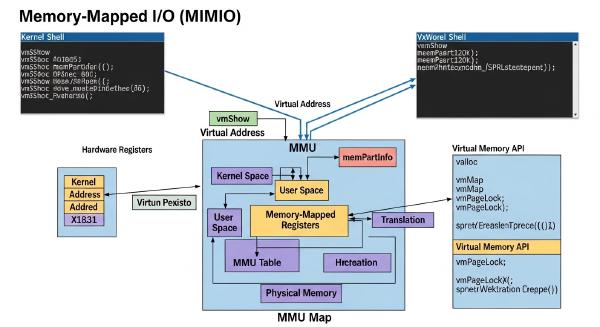
Modern processors use a Memory Management Unit (MMU) to translate virtual addresses used by software into physical addresses used by hardware.
VxWorks 7 takes advantage of this separation to provide stronger memory protection and more controlled address mapping.
🧠 Understanding Physical and Virtual Addresses #
The distinction between physical and virtual addresses is fundamental when working with memory-mapped hardware.
- Physical address: The address assigned to a hardware register or memory region.
- Virtual address: The address that software uses when accessing that region through a pointer.
For example, a hardware device might expose registers beginning at:
Physical address: 0xffd02000After mapping that region, VxWorks might provide a virtual address such as:
Virtual address: 0x228f7000Software should then access 0x228f7000, rather than assuming that the physical address is directly accessible.
In VxWorks 7, only physical regions that have been appropriately mapped into the virtual address space can be accessed by kernel code.
Attempting to access an unmapped physical address as though it were a virtual address can therefore result in a data-abort exception.
🔍 Inspecting the Current Address Map #
Before creating a new mapping, it is useful to inspect the mappings that already exist.
The vmContextShow command displays the current virtual-to-physical address relationships:
-> vmContextShow

VIRTUAL ADDR  BLOCK LENGTH  PHYSICAL ADDR  PROT    CACHE   SPECIAL

0x22000000    0x00004000    0xffd08000     RW-     OFF/CO/G ...
0x22008000    0x00001000    0xffd05000     RW-     OFF/CO/G ...
...
If the physical address 0xffd02000 does not appear in the mapping table, there is no corresponding virtual mapping available for the shell to use.
That explains why a direct access attempt fails.
🧩 Why Some Device Regions Are Already Mapped #
A common question is why some hardware registers can be accessed while others cannot.
The answer is closely related to the device-tree configuration and driver initialization process.
During system startup, VxWorks can use the device tree to identify hardware devices and initialize their associated drivers. Drivers then establish the mappings they require to communicate with their hardware.
As a result, a device that is already claimed and initialized by a driver may have its register region mapped into the kernel’s virtual address space.
A device that is not currently used by a driver may have no such mapping.
This means the absence of a mapping does not necessarily indicate a hardware problem. It can simply mean that the required address range has not yet been mapped.
🛠️ Mapping a Device Register Manually #
When a device register region is not mapped automatically, VxWorks provides pmapGlobalMap() for creating a global mapping.
The function has the following form:
void* pmapGlobalMap(PHYS_ADDR addr, size_t len, UINT attrs);The main parameters are:
addr— The physical address of the hardware region.len— The size of the region to map, normally covering at least a complete memory page.attrs— The memory attributes controlling access permissions and caching behavior.
The returned pointer represents the virtual address that software can use to access the mapped region.
🧪 Example: Mapping the L4 Watchdog Timer #
For the L4 Watchdog Timer at physical address 0xffd02000, a 4 KB region can be mapped with:
-> l4wd0 = pmapGlobalMap (0xffd02000ULL, 0x1000, 0x483)

New symbol "l4wd0" added to kernel symbol table.

l4wd0 = 0x228f7000
The important part is the difference between the two addresses:
Physical address: 0xffd02000
Virtual address:  0x228f7000
The 0x483 attribute value specifies the memory behavior for this mapping. In this example, it provides read/write access, disables caching, and enables guarded access. These settings are derived from the relevant MMU_ATTR_* definitions in vmLibCommon.h.
Once the mapping has been created, the returned virtual address can be passed to the usual kernel-shell memory commands.
For example:
-> d l4wd0, 32, 4

0x228f7000: 00000001 000000ff 7b02c5be 00000000 ...
The register can now be accessed through the virtual address returned by pmapGlobalMap().
🔎 Verifying the New Mapping #
It is good practice to verify that the mapping was created correctly.
Run:
-> vmContextShow

...
0x228f7000  0x00001000  0xffd02000  RW-  OFF/CO/G ...
The output confirms the relationship:
Virtual address  ->  Physical address
0x228f7000           0xffd02000
The mapping also shows the expected permissions and memory attributes.
This provides a useful diagnostic step when debugging hardware initialization or a new BSP.
💡 Practical Workflow for Register Debugging #
When a memory-mapped register needs to be inspected in VxWorks 7, a straightforward workflow is:
- Identify the physical address of the device register.
- Use
vmContextShowto determine whether the region is already mapped. - If a suitable mapping exists, use its virtual address for register access.
- If no mapping exists, create one with
pmapGlobalMap(). - Use the returned virtual address with kernel-shell commands such as
dandm. - Run
vmContextShowagain to verify the mapping. - Exercise caution when writing registers because incorrect values can alter hardware state or destabilize the system.
This approach is particularly useful during BSP development, driver bring-up, and low-level hardware debugging.
🚀 Conclusion #
Accessing device registers from the VxWorks 7 kernel shell requires a slightly different approach from VxWorks 6.9.
The essential concept is simple: a hardware register’s physical address is not automatically a valid virtual address for kernel software.
When the required region has not already been mapped, use pmapGlobalMap() to create the mapping:
Physical address
       ↓
pmapGlobalMap()
       ↓
Virtual address
       ↓
Kernel-shell register access
Once the mapping exists, the virtual address returned by pmapGlobalMap() can be used with the familiar d and m commands.
Although this adds an extra step compared with older VxWorks releases, the separation between physical and virtual memory provides stronger protection and greater control over how hardware resources are exposed to software. For VxWorks 7 developers working on BSPs, drivers, and hardware bring-up, understanding this address-translation model is an essential part of low-level debugging.